A browser-based pixel-art editor for voxel-game block textures. Real-time 3D preview, pack workflow, an animation timeline, and engine-ready exports for Minecraft, Tiled, and the indie engine stack - free to start.
Block textures share edges. Sister textures share palettes. Every engine wants the same artwork in a different shape. You spend more time on the loop than the art.
Paint flat, fix seams, repeat.
You can't see the seam until you ship the texture, reload the game, and look at the block. Then back to the editor.
Thirty textures, thirty files.
A resource pack is one thing. Your editor treats it as thirty unrelated files with no shared palette and no sister-texture relationships.
Every engine, a different shape.
Minecraft Java wants per-face PNGs in a specific tree. Bedrock wants something else. Generic engines want an atlas. The remapping is on you.
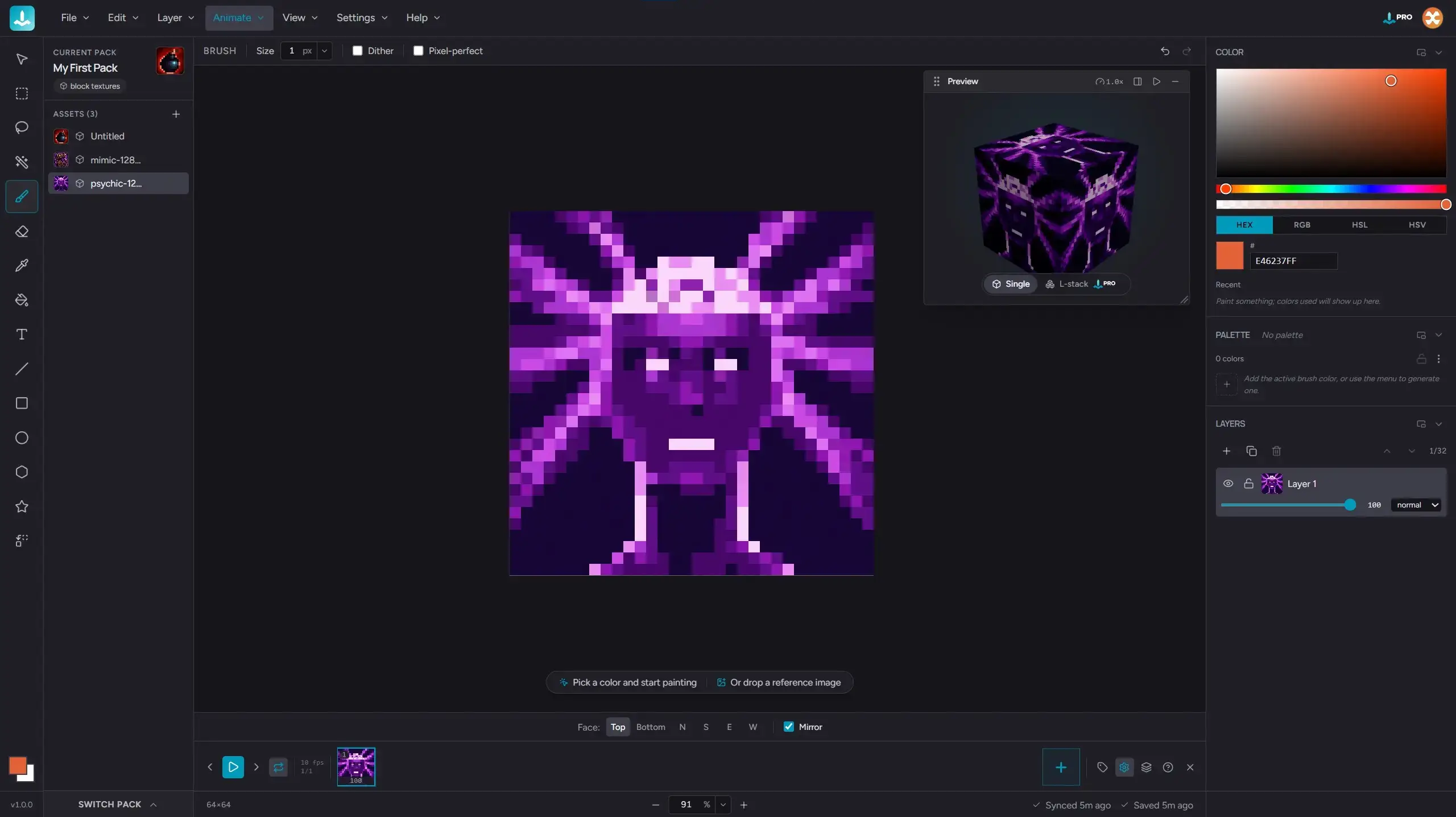
The 3D preview
Paint the face. See the block.
The 3D preview rotates a painted cube, then switches to an L-stack stair shape so the texture wraps across multiple adjacent faces.
A live 3D preview rotates while you paint. Single cube for simple blocks, L-stack for stairs and slabs, so the texture wraps across multiple adjacent faces.
Watch the seams meet in real time. No reload loop, no guesswork, no surprise mismatches when you ship.
The pack workflow
Your whole pack, in one place.
The pack browser opens, the artist switches between assets, the shared palette persists, and a sister-texture relationship is visible in the asset panel.
A pack holds every asset for one resource pack: textures, palette, references, sister-texture relationships. Switch between assets without opening a new file.
Lock a shared palette across the pack so your stone and your dirt agree on what gray is. Drag-reorder, multi-select, set-as-cover. The pack is the unit, not the asset.
The export flow
One pack. Every engine.
Pick your engine. Hexcalibur produces the file tree, naming convention, and metadata it expects. Per-face PNGs for Minecraft Java with the right block-model JSON and pack_format. A correctly-shaped atlas for ThreeJS, Babylon, Godot, and Unity. A Tiled .tsx for 2D engines. No manual remapping.
The export dialog cycles through engine options, the artist selects Minecraft Java, and a correctly-shaped ZIP appears in the downloads folder.
Versioned presets. When Minecraft ships a new pack_format, the matching preset lands within 14 days. New engines added as users surface them.
Animation
Paint the frames. Ship the loop.
An artist scrubs a multi-frame walk cycle on the timeline with onion-skin showing the previous frame ghosted, then the export dialog produces a GIF and a sprite sheet side by side.
A full frame timeline with onion-skin and tags. Paint each frame, scrub the loop, group frames into named tags for walk cycles, idle animations, and FX sequences. Pixel-perfect timing, baked in.
Export per tag as animated GIF, lossless APNG, or a sprite sheet that Phaser, Unity, Godot, and Three.js read directly. One canvas, every animated format your engine actually wants.
Tilemaps & tiles
Build the whole world, tile by tile.
Import a tileset or draw your own tiles, stamp single tiles or whole multi-tile blocks, and paint maps as their own layers. The power tools - terrain generation and seamless tiles - come with Pro.
The rest of the editor
Everything else a serious pixel editor needs.
Beyond the 3D preview, packs, and engines, Hexcalibur is still a full-strength pixel-art editor. Tools, palette workflow, references, and ergonomics that hold up to a long session.
Who it's for
Built for two kinds of artists.
Pixel artists
If you live in a 16-pixel grid, Hexcalibur is a modern, browser-based home for your work. Layers, palette tools, references, brushes, keyboard shortcuts, animation timeline with GIF export. Free to start on one pack with eight assets, no card.
Voxel game devs
If you ship block textures for Minecraft Java mods, Bedrock add-ons, or your own ThreeJS / Babylon / Godot / Unity voxel game, Hexcalibur compresses the texture loop into a single tab. 3D preview, pack-level workflow, engine-aware export. Pro for the full toolkit.
What you get
The mechanics, in plain English.
No fine print. No quotas to babysit. No surprise charges. The promises below are the whole deal.
Local-first
Your art saves to your browser first. The free plan never uploads. Pro adds cloud sync that keeps your packs in step across devices, private to your account.
Free forever
One pack with eight assets, the full 2D editor, single-cube 3D preview, animated GIF export. No timer, no card.
Cancel anytime
Pro is month-to-month. Annual is like getting six months free. Lifetime is one payment, every future update included.
No install
Any modern browser, any operating system. Nothing to download, nothing to update.
Pricing
Free to start. Pro when you outgrow it.
One pack free, full 2D editor, no card required. Pro adds multi-shape 3D preview, every engine export, cloud sync, and unlimited packs.
Cancel any timeBilling handled by PolarTax included where required
Apple Pay and Google Pay appear on supported devices and browsers.
Compare Free and Pro
Every paid plan - Monthly, Annual, and Lifetime - includes all of Pro. Here's exactly what unlocks when you upgrade.
Feature
Free$0
Profrom $5/mo
Editor & art
Full 2D pixel editor
Layers, blend modes, locking
Palette building + reference overlay
Color-scheme generator (color theory)
Packs & sync
Packs
1
Unlimited
Assets per pack
8
Unlimited
Cloud sync across devices
Version history with rollback
3D preview
Single-cube preview
Multi-shape preview (L-stack)
Stair & slab derivation
Tilemaps & tiles
Paint tilemaps (tile layers)
Tile stamp + multi-tile blocks
Import or draw your own tileset
Replace / clear tiles across a map
Terrain generation + autotiling
Make Seamless tiles
Animation
Timeline with onion-skin
Frames
Up to 3
Unlimited
Tags per asset
1
Unlimited
Exports
PNG (single asset)
Animated GIF
Minecraft Java
Minecraft Bedrock
Tiled tilemap
Generic atlas (ThreeJS / Babylon / Godot / Unity)
Raw per-face ZIP
APNG, sprite-sheet, WebM, .mcmeta
Pack-scope export (whole pack to one ZIP)
FAQ
Questions, mostly answered.
What is Hexcalibur?
Hexcalibur is a browser-based pixel-art editor for voxel-game block textures. It pairs a full pixel-art toolset (layers, palette tools, animation timeline) with a multi-shape 3D preview, pack-level workflow, and engine-aware export for Minecraft Java, Bedrock, Tiled, and any ThreeJS / Babylon / Godot / Unity voxel engine.
Does my work upload to a server?
By default, no - Hexcalibur saves to your browser's local storage, and on the free plan nothing leaves your device. Pro adds cloud sync: your packs are uploaded to our servers (hosted on Supabase) so they're backed up and follow you across devices, private to your account. We never sell your art, share it, or use it to train anything.
Do I need an account?
Yes - you'll need a free Axidus account to use Hexcalibur. It takes a few seconds and no card is required. One account works across every Axidus app, and it's where your Pro upgrade lives if you choose one.
Which engines can I export to?
Hexcalibur ships with named presets for Minecraft Java (resource packs, every pack_format from 1.20 through 26.1.2), Minecraft Bedrock (add-ons), Tiled tilemap (.tsx), a generic atlas in TexturePacker JSON-Hash format that Phaser, Babylon, Godot, Three.js, and Unity all consume, plus a Raw per-face ZIP (+x/-x/+y/-y/+z/-z PNGs) and a Custom exporter for any other voxel engine. When Mojang ships a new pack_format, we ship the matching preset within 14 days.
Does Hexcalibur support animation?
Yes. The animation timeline supports multi-frame assets, onion-skin, and named tags for walk cycles, idle loops, and FX sequences. The free tier exports animated GIF; Pro adds lossless APNG and a sprite-sheet format that Phaser, Unity, Godot, and Three.js read directly. Animated-texture export per engine is on the v1.1+ roadmap.
What's free and what's behind Pro?
Free covers the full 2D editor with every tool, layer, palette feature, and blend mode, plus the single-cube 3D preview, local autosave, per-asset PNG export to any engine, per-layer export, and animated GIF export - on 1 pack with up to 8 assets. Pro adds unlimited packs and assets, multi-shape 3D preview (L-stack), cloud sync across devices, stair and slab derivation, multi-asset and pack-scope engine bundles, and APNG + sprite-sheet export.
Nothing is locked away. Your work stays in your browser. Cloud-synced packs stay readable. New cloud writes pause, the shape-mode selector falls back to single-cube, and pack-scope export becomes gated again until you resubscribe.
What browsers and devices are supported?
Hexcalibur runs in any modern browser with WebGL2 - Chrome, Edge, Safari, and Firefox (latest two majors) - on Windows, macOS, Linux, and Chromebook. Desktop with mouse or trackpad is the tested target today. Tablets technically load and basic touch input is captured, but a proper touch-and-tablet optimization pass (including iPad with Apple Pencil pressure-sensitive painting) is on the roadmap. Mobile phones aren't a target form factor - the multi-panel workspace assumes a desktop or tablet screen size.
What's the file-size limit on imports?
4 MB per image, any of PNG, JPEG, or WEBP. Drag straight onto the canvas, import as a new asset or as a layer on the current one.
Will my purchase include future updates?
Pro subscriptions get every new feature for as long as the subscription is active. Lifetime includes every future Pro feature, forever - new engine presets as they ship, plus the animation, 3D-preview, and workflow upgrades on the Pro roadmap.
Is this in beta? Is it stable?
Yes to both. Hexcalibur is in public beta. Your work is yours, the autosave is real, the exports work. New features land regularly. Bug reports go straight to a human.
Can I use Hexcalibur commercially?
Yes. Your art is yours regardless of tier. Sell your packs, ship them with your game, post them anywhere.
Open the editor. Start painting.
Free to start. No install. Your art stays in your browser. Upgrade to Pro for multi-shape 3D preview, every engine export, and unlimited packs.